Describe
Write the character, item, creature, or style you need.
AI pixel art for game developers
Create pixel art sprites from text, animate them into consistent sprite sheets, and export PNG, GIF, or JSON for your game engine.
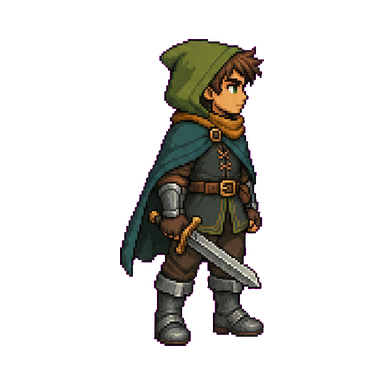
“A nimble forest adventurer with a green cloak and short sword.”
Side view · 48 × 64 · Transparent
 01
01 02
02 03
03 04
04 Unity
Unity Godot
Godot RPG Maker
 GameMaker
 Unreal Engine
One workflow, from idea to engine
Describe a character, generate a pixel-art sprite, animate it into consistent frames, then export the files your project needs.
Write the character, item, creature, or style you need.
Choose perspective, direction, size, and outline.
Pick an action and create a consistent frame sequence.
Download PNG, GIF, or JSON for your workflow.
Bring the files into your game engine or platform.
When art becomes the bottleneck
Create and test pixel-art characters without putting every prototype, animation, or revision behind a long art queue.
Turn a clear character idea into a pixel-art starting point you can use in your build.
Generate a base sprite, then move directly into the animation sequence you need.
Keep the same character, silhouette, proportions, and palette across a sequence.
Explore new heroes, enemies, and motions before committing more time and budget.
AI sprite generator
Generate transparent pixel sprites from text, then tune perspective, direction, size, and outline for your game.
Sprite animation generator
Choose an action, set the frame count, preview the motion, and export the result.
01020304 05
05 06
06Game asset toolbox
Edit, split, resize, convert, and package sprites for common game engines and animation workflows.
Refine edges, adjust colors, and fix individual pixels before export.
Separate a sprite sheet into individual frames for editing or export.
Convert an animated GIF into a clean, frame-by-frame sprite sheet.
Turn a sprite sheet into a looping GIF for previews and sharing.
Scale pixel art up or down while preserving crisp, hard edges.
Pack sprites and frame data into an export-ready texture atlas.
Build PNG and XML TextureAtlas files for Friday Night Funkin' character animations.
Arrange character frames in the 3 × 4 grid format used by RPG Maker.
Pack animation frames into a horizontal strip ready for GameMaker import.
Made for pixel games
Characters, enemies, and motions for side-view, top-down, and isometric game concepts.


Export your way
Download transparent sprites, looping animation previews, and frame metadata for your game workflow.
Transparent sprites and sprite sheets for use in your project.
A looping preview for sharing and reviewing animation.

Frame metadata for animation and engine workflows.
{
  "image": "run.png",
  "frameWidth": 256,
  "frameHeight": 256,
  "count": 6,
  "fps": 9,
  "loop": true
}
How it works
Write the character, creature, item, and visual details you want.
Choose perspective, direction, size, and outline.
Select an action, frame count, and generation mode.
Download your files and bring them into your project.
Pricing
Try the core workflow with the free plan. Upgrade for more monthly credits, or top up when you need extra capacity.
FAQ
Start creating
Describe it, animate it, and export it for your game.